


Achieve The Utmost Performance In NSE8_812 Exam Pass Guaranteed
Achive your Success with Latest Fortinet NSE8_812 Exam
Fortinet NSE8_812 exam, also known as the Fortinet NSE 8 Written Exam, is a certification exam designed for experienced professionals who are proficient in designing, implementing, and managing complex security solutions using Fortinet products. Fortinet NSE 8 - Written Exam (NSE8_812) certification is recognized worldwide and is highly valued by employers who seek qualified security experts.
NEW QUESTION # 19
On a FortiGate Configured in Transparent mode, which configuration option allows you to control Multicast traffic passing through the?
- A.

- B.

- C.

- D.

Answer: D
Explanation:
To control multicast traffic passing through a FortiGate configured in transparent mode, you can use multicast policies. Multicast policies allow you to filter multicast traffic based on source and destination addresses, protocols, and interfaces. You can also apply security profiles to scan multicast traffic for threats and violations. Reference: https://docs.fortinet.com/document/fortigate/6.2.14/cookbook/968606/configuring-multicast-forwarding
NEW QUESTION # 20
A remote worker requests access to an SSH server inside the network. You deployed a ZTNA Rule to their FortiClient. You need to follow the security requirements to inspect this traffic.
Which two statements are true regarding the requirements? (Choose two.)
- A. FortiGate can perform SSH access proxy host-key validation.
- B. Traffic is discarded as ZTNA does not support SSH connection rules
- C. SSH traffic is tunneled between the client and the access proxy over HTTPS
- D. You need to configure a FortiClient SSL-VPN tunnel to inspect the SSH traffic.
Answer: A,C
Explanation:
ZTNA supports SSH connection rules that allow remote workers to access SSH servers inside the network through an HTTPS tunnel between the client and the access proxy (FortiGate). The access proxy acts as an SSH client to connect to the real SSH server on behalf of the user, and performs host-key validation to verify the identity of the server. The user can use any SSH client that supports HTTPS proxy settings, such as PuTTY or OpenSSH. References: https://docs.fortinet.com/document/fortigate/7.0.0/ztna-deployment/899992/configuring-ztna-rules-to-control-access
NEW QUESTION # 21
An automation stitch was configured using an incoming webhook as the trigger named 'my_incoming_webhook'. The action is configured to execute the CLI Script shown:
- A.

- B.

- C.

- D.

Answer: A
Explanation:
To execute the CLI script shown using an incoming webhook as the trigger, the correct syntax for the curl command is: curl -X POST -H "Content-Type: application/json" -d '{"trigger_name":"my_incoming_webhook"}' https://fortisoar.example.com/api/v1/trigger This command will send a POST request to the FortiSOAR API endpoint with the trigger name and the content type as JSON. The FortiSOAR API will then execute the automation stitch that matches the trigger name and run the CLI script on the FortiGate device. Reference: https://docs.fortinet.com/document/fortisoar/7.0.0/administration-guide/103440/automation-stitches https://docs.fortinet.com/document/fortisoar/7.0.0/administration-guide/103441/incoming-webhook
NEW QUESTION # 22
You want to use the MTA adapter feature on FortiSandbox in an HA-Cluster. Which statement about this solution is true?
- A. The MTA adapter is only available in the primary node.
- B. The MTA adapter mode is only detection mode.
- C. The configuration is different than on a standalone device.
- D. The configuration of the MTA Adapter Local Interface is different than on port1.
Answer: A
Explanation:
The MTA adapter feature on FortiSandbox is a feature that allows FortiSandbox to act as a mail transfer agent (MTA) that can receive, inspect, and forward email messages from external sources. The MTA adapter feature can be used to integrate FortiSandbox with third-party email security solutions that do not support direct integration with FortiSandbox, such as Microsoft Exchange Server or Cisco Email Security Appliance (ESA). The MTA adapter feature can also be used to enhance email security by adding an additional layer of inspection and filtering before delivering email messages to the final destination. The MTA adapter feature can be enabled on FortiSandbox in an HA-Cluster, which is a configuration that allows two FortiSandbox units to synchronize their settings and data and provide high availability and load balancing for sandboxing services. However, one statement about this solution that is true is that the MTA adapter is only available in the primary node. This means that only one FortiSandbox unit in the HA-Cluster can act as an MTA and receive email messages from external sources, while the other unit acts as a backup node that can take over the MTA role if the primary node fails or loses connectivity. This also means that only one IP address or FQDN can be used to configure the external sources to send email messages to the FortiSandbox MTA, which is the IP address or FQDN of the primary node. References: https://docs.fortinet.com/document/fortisandbox/3.2.0/administration-guide/19662/mail-transfer-agent-mta https://docs.fortinet.com/document/fortisandbox/3.2.0/administration-guide/19662/high-availability-ha
NEW QUESTION # 23
You are migrating the branches of a customer to FortiGate devices. They require independent routing tables on the LAN side of the network.
After reviewing the design, you notice the firewall will have many BGP sessions as you have two data centers (DC) and two ISPs per DC while each branch is using at least 10 internal segments.
Based on this scenario, what would you suggest as the more efficient solution, considering that in the future the number of internal segments, DCs or internet links per DC will increase?
- A. No change in design is needed as even small FortiGate devices have a large memory capacity.
- B. Redesign the SD-WAN deployment to only use a single VPN tunnel and segment traffic using VRFs on BGP
- C. Implement network-id, neighbor-group and increase the advertisement-interval
- D. Acquire a FortiGate model with more capacity, considering the next 5 years growth.
Answer: B
Explanation:
Using multiple VPN tunnels and BGP sessions for each internal segment is not scalable and efficient, especially when the number of segments, DCs or internet links per DC increases. A better solution is to use a single VPN tunnel per branch and segment traffic using virtual routing and forwarding (VRF) instances on BGP. This way, each VRF can have its own routing table and BGP session, while sharing the same VPN tunnel. References: https://docs.fortinet.com/document/fortigate/6.4.0/cookbook/103439/sd-wan-with-vrf-and-bgp
NEW QUESTION # 24
Refer to the exhibit.
A customer has deployed a FortiGate 300E with virtual domains (VDOMs) enabled in the multi-VDOM mode. There are three VDOMs: Root is for management and internet access, while VDOM 1 and VDOM 2 are used for segregating internal traffic. AccountVInk and SalesVInk are standard VDOM links in Ethernet mode.
Given the exhibit, which two statements below about VDOM behavior are correct? (Choose two.)
- A. Traffic on AccountVInk and SalesVInk will not be accelerated.
- B. You can apply OSPF routing on the VDOM link in either PPP or Ethernet mode
- C. Root VDOM is an Admin type VDOM, while VDOM 1 and VDOM 2 are Traffic type VDOMs.
- D. OSPF routing can be configured between VDOM 1 and Root VDOM without any configuration changes to AccountVInk
- E. The VDOM links are in Ethernet mode because they have IP addressed assigned on both sides.
Answer: A,C
Explanation:
The FortiGate configuration shown in the exhibit is using virtual domains (VDOMs) enabled in multi-VDOM mode. There are three VDOMs: Root is for management and internet access, while VDOM 1 and VDOM 2 are used for segregating internal traffic. AccountVInk and SalesVInk are standard VDOM links in Ethernet mode. One correct statement about VDOM behavior is that traffic on AccountVInk and SalesVInk will not be accelerated. This is because standard VDOM links do not support hardware acceleration features such as NP6 or CP9 offloading, which can improve performance and throughput for traffic between VDOMs. To enable hardware acceleration for inter-VDOM traffic, non-standard VDOM links such as NP6 or CP9 interfaces should be used instead of standard VDOM links. Another correct statement about VDOM behavior is that Root VDOM is an Admin type VDOM, while VDOM 1 and VDOM 2 are Traffic type VDOMs. This is because Admin type VDOMs are special VDOMs that can only be used for management purposes and cannot process any traffic other than management traffic (such as SSH, HTTPS, SNMP, etc.). Traffic type VDOMs are normal VDOMs that can process any kind of traffic (such as firewall policies, VPN tunnels, routing protocols, etc.). By default, Root VDOM is an Admin type VDOM that can manage other Traffic type VDOMs, unless it is converted to a Traffic type VDOM by using the set vdom-admin enable command. Reference: https://docs.fortinet.com/document/fortigate/7.0.0/administration-guide/19662/virtual-domains https://docs.fortinet.com/document/fortigate/7.0.0/hardware-acceleration-guide/19662/vdom-links
NEW QUESTION # 25
Refer to the exhibit containing the configuration snippets from the FortiGate. Customer requirements:
* SSLVPN Portal must be accessible on standard HTTPS port (TCP/443)
* Public IP address (129.11.1.100) is assigned to portl
* Datacenter.acmecorp.com resolves to the public IP address assigned to portl The customer has a Let's Encrypt certificate that is going to expire soon and it reports that subsequent attempts to renew that certificate are failing.
Reviewing the requirement and the exhibit, which configuration change below will resolve this issue?
A)
B)
C)

- A. Option B
- B. Option A
- C. Option D
- D. Option C
Answer: A
Explanation:
The customer's SSLVPN Portal is currently configured to use a self-signed certificate. This means that the certificate is not trusted by any browsers, and users will have to accept a security warning before they can connect to the portal.
To resolve this issue, the customer needs to configure the FortiGate to use a Let's Encrypt certificate. Let's Encrypt is a free certificate authority that provides trusted certificates for websites and other applications.
The configuration change in option B will configure the FortiGate to use a Let's Encrypt certificate for the SSLVPN Portal. This will allow users to connect to the portal without having to accept a security warning.
The other configuration changes are not necessary to resolve the issue. Option A will configure the FortiGate to use a different port for the SSLVPN Portal, but this will not resolve the issue with the self-signed certificate. Option C will configure the FortiGate to use a different DNS name for the SSLVPN Portal, but this will also not resolve the issue with the self-signed certificate. Option D will configure the FortiGate to use a different certificate authority for the SSLVPN Portal, but this will also not resolve the issue because the customer still needs to use a trusted certificate.
References:
Configuring SSLVPN with Let's Encrypt: https://docs.fortinet.com/document/fortigate/7.0.0/administration-guide/822087/acme-certificate-support Let's Encrypt: https://letsencrypt.org/
NEW QUESTION # 26
Refer to the exhibits.
The exhibits show a FortiGate network topology and the output of the status of high availability on the FortiGate.
Given this information, which statement is correct?
- A. FGVMEVLQOG33WM3D and FGVMEVGCJNHFYI4A share a virtual MAC address.
- B. The cluster mode can support a maximum of four (4) FortiGate VMs
- C. The cluster members are on the same network and the IP addresses were statically assigned.
- D. The ethertype values of the HA packets are 0x8890, 0x8891, and 0x8892
Answer: A
Explanation:
The output of the status of high availability on the FortiGate shows that the cluster mode is active-passive, which means that only one FortiGate unit is active at a time, while the other unit is in standby mode. The active unit handles all traffic and also sends HA heartbeat packets to monitor the standby unit. The standby unit becomes active if it stops receiving heartbeat packets from the active unit, or if it receives a higher priority from another cluster unit. In active-passive mode, all cluster units share a virtual MAC address for each interface, which is used as the source MAC address for all packets forwarded by the cluster. Reference: https://docs.fortinet.com/document/fortigate/6.4.0/cookbook/103439/high-availability-with-two-fortigates
NEW QUESTION # 27
Refer to the exhibits.
Exhibit A
Exhibit B
Exhibit C
A customer is trying to set up a VPN with a FortiGate, but they do not have a backup of the configuration. Output during a troubleshooting session is shown in the exhibits A and B and a baseline VPN configuration is shown in Exhibit C Referring to the exhibits, which configuration will restore VPN connectivity?
- A.

- B.

- C.

- D.
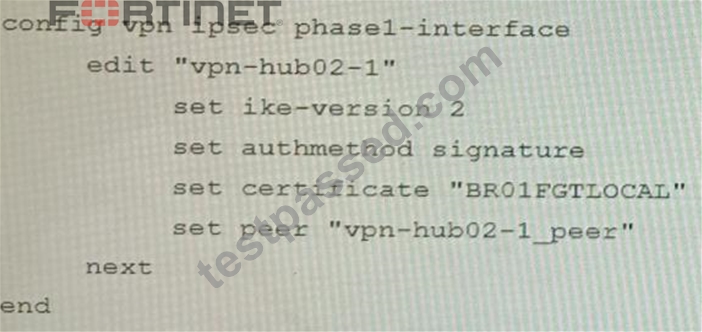
Answer: A
Explanation:
The output in Exhibit A shows that the VPN tunnel is not established because the peer IP address is incorrect. The output in Exhibit B shows that the peer IP address is 192.168.1.100, but the baseline VPN configuration in Exhibit C shows that the peer IP address should be 192.168.1.101.
To restore VPN connectivity, you need to change the peer IP address in the VPN tunnel configuration to 192.168.1.101. The correct configuration is shown below:
config vpn ipsec phase1-interface
edit "wan"
set peer-ip 192.168.1.101
set peer-id 192.168.1.101
set dhgrp 1
set auth-mode psk
set psk SECRET_PSK
next
end
Option A is incorrect because it does not change the peer IP address. Option B is incorrect because it changes the peer IP address to 192.168.1.100, which is the incorrect IP address. Option D is incorrect because it does not include the necessary configuration for the VPN tunnel.
NEW QUESTION # 28
A customer's cybersecurity department needs to implement security for the traffic between two VPCs in AWS, but these belong to different departments within the company. The company uses a single region for all their VPCs.
Which two actions will achieve this requirement while keeping separate management of each department's VPC? (Choose two.)
- A. Create an 1AM account for the cybersecurity department to manage both existing VPC, create a FortiGate HA Cluster on each VPC and IPSEC VPN to force traffic between the VPCs through the FortiGate clusters
- B. Create a VPC with a FortiGate auto-scaling group with a Transit Gateway attached to the three VPC to force routing through the FortiGate cluster
- C. Create a transit VPC with a FortiGate HA cluster, connect to the other two using VPC peering, and use routing tables to force traffic through the FortiGate cluster.
- D. Migrate all the instances to the same VPC and create 1AM accounts for each department, then implement a new subnet for a FortiGate auto-scaling group and use routing tables to force the traffic through the FortiGate cluster.
Answer: B,C
Explanation:
To implement security for the traffic between two VPCs in AWS, while keeping separate management of each department's VPC, two possible actions are:
Create a transit VPC with a FortiGate HA cluster, connect to the other two using VPC peering, and use routing tables to force traffic through the FortiGate cluster. This option allows the cybersecurity department to manage the transit VPC and apply security policies on the FortiGate cluster, while the other departments can manage their own VPCs and instances. The VPC peering connections enable direct communication between the VPCs without using public IPs or gateways. The routing tables can be configured to direct all inter-VPC traffic to the transit VPC.
Create a VPC with a FortiGate auto-scaling group with a Transit Gateway attached to the three VPCs to force routing through the FortiGate cluster. This option also allows the cybersecurity department to manage the security VPC and apply security policies on the FortiGate cluster, while the other departments can manage their own VPCs and instances. The Transit Gateway acts as a network hub that connects multiple VPCs and on-premises networks. The routing tables can be configured to direct all inter-VPC traffic to the security VPC. Reference: https://docs.fortinet.com/document/fortigate-public-cloud/7.2.0/aws-administration-guide/506140/connecting-a-local-fortigate-to-an-aws-vpc-vpn https://docs.fortinet.com/document/fortigate-public-cloud/7.0.0/sd-wan-architecture-for-enterprise/166334/sd-wan-configuration
NEW QUESTION # 29
Refer to the exhibit.
You are operating an internal network with multiple OSPF routers on the same LAN segment. FGT_3 needs to be added to the OSPF network and has the configuration shown in the exhibit. FGT_3 is not establishing any OSPF connection.
What needs to be changed to the configuration to make sure FGT_3 will establish OSPF neighbors without affecting the DR/BDR election?
- A.

- B.

- C.

- D.

Answer: D
Explanation:
The OSPF configuration shown in the exhibit is using the default priority value of 1 for the interface port1. This means that FGT_3 will participate in the DR/BDR election process with the other OSPF routers on the same LAN segment. However, this is not desirable because FGT_3 is a new device that needs to be added to the OSPF network without affecting the existing DR/BDR election. Therefore, to make sure FGT_3 will establish OSPF neighbors without affecting the DR/BDR election, the priority value of the interface port1 should be changed to 0. This will prevent FGT_3 from becoming a DR or BDR and allow it to form OSPF adjacencies with the current DR and BDR. Option B shows the correct configuration that changes the priority value to 0. Option A is incorrect because it does not change the priority value. Option C is incorrect because it changes the network type to point-to-point, which is not suitable for a LAN segment with multiple OSPF routers. Option D is incorrect because it changes the area ID to 0.0.0.1, which does not match the area ID of the other OSPF routers on the same LAN segment. Reference: https://docs.fortinet.com/document/fortigate/7.0.0/administration-guide/358640/basic-ospf-example
NEW QUESTION # 30
A customer's cybersecurity department needs to implement security for the traffic between two VPCs in AWS, but these belong to different departments within the company. The company uses a single region for all their VPCs.
Which two actions will achieve this requirement while keeping separate management of each department's VPC? (Choose two.)
- A. Create an 1AM account for the cybersecurity department to manage both existing VPC, create a FortiGate HA Cluster on each VPC and IPSEC VPN to force traffic between the VPCs through the FortiGate clusters
- B. Create a VPC with a FortiGate auto-scaling group with a Transit Gateway attached to the three VPC to force routing through the FortiGate cluster
- C. Create a transit VPC with a FortiGate HA cluster, connect to the other two using VPC peering, and use routing tables to force traffic through the FortiGate cluster.
- D. Migrate all the instances to the same VPC and create 1AM accounts for each department, then implement a new subnet for a FortiGate auto-scaling group and use routing tables to force the traffic through the FortiGate cluster.
Answer: B,C
Explanation:
To implement security for the traffic between two VPCs in AWS, while keeping separate management of each department's VPC, two possible actions are:
Create a transit VPC with a FortiGate HA cluster, connect to the other two using VPC peering, and use routing tables to force traffic through the FortiGate cluster. This option allows the cybersecurity department to manage the transit VPC and apply security policies on the FortiGate cluster, while the other departments can manage their own VPCs and instances. The VPC peering connections enable direct communication between the VPCs without using public IPs or gateways. The routing tables can be configured to direct all inter-VPC traffic to the transit VPC.
Create a VPC with a FortiGate auto-scaling group with a Transit Gateway attached to the three VPCs to force routing through the FortiGate cluster. This option also allows the cybersecurity department to manage the security VPC and apply security policies on the FortiGate cluster, while the other departments can manage their own VPCs and instances. The Transit Gateway acts as a network hub that connects multiple VPCs and on-premises networks. The routing tables can be configured to direct all inter-VPC traffic to the security VPC. References: https://docs.fortinet.com/document/fortigate-public-cloud/7.2.0/aws-administration-guide/506140/connecting-a-local-fortigate-to-an-aws-vpc-vpn https://docs.fortinet.com/document/fortigate-public-cloud/7.0.0/sd-wan-architecture-for-enterprise/166334/sd-wan-configuration
NEW QUESTION # 31
On a FortiGate Configured in Transparent mode, which configuration option allows you to control Multicast traffic passing through the?
- A.
- B.
- C.
- D.
Answer: D
Explanation:
To control multicast traffic passing through a FortiGate configured in transparent mode, you can use multicast policies. Multicast policies allow you to filter multicast traffic based on source and destination addresses, protocols, and interfaces. You can also apply security profiles to scan multicast traffic for threats and violations. References: https://docs.fortinet.com/document/fortigate/6.2.14/cookbook/968606/configuring-multicast-forwarding
NEW QUESTION # 32
Refer to the exhibit.
The exhibit shows two error messages from a FortiGate root Security Fabric device when you try to configure a new connection to a FortiClient EMS Server.
Referring to the exhibit, which two actions will fix these errors? (Choose two.)
- A. Authorize the root FortiGate on the FortiClient EMS
- B. Install a new known CA on the Win2K16-EMS server.
- C. Export and import the FortiClient EMS server certificate to the root FortiGate.
- D. Verify that the CRL is accessible from the root FortiGate
Answer: A,D
Explanation:
A is correct because the error message "The CRL is not accessible" indicates that the root FortiGate cannot access the CRL for the FortiClient EMS server. Verifying that the CRL is accessible will fix this error.
D is correct because the error message "The FortiClient EMS server is not authorized" indicates that the root FortiGate is not authorized to connect to the FortiClient EMS server. Authorizing the root FortiGate on the FortiClient EMS server will fix this error.
The other options are incorrect. Option B is incorrect because exporting and importing the FortiClient EMS server certificate to the root FortiGate will not fix the CRL error. Option C is incorrect because installing a new known CA on the Win2K16-EMS server will not fix the authorization error.
References:
Troubleshooting FortiClient EMS connectivity | FortiClient / FortiOS 7.0.0 - Fortinet Document Library Authorizing FortiGates with FortiClient EMS | FortiClient / FortiOS 6.4.8 - Fortinet Document Library
NEW QUESTION # 33
Refer to the exhibit showing a FortiSOAR playbook.
You are investigating a suspicious e-mail alert on FortiSOAR, and after reviewing the executed playbook, you can see that it requires intervention.
What should be your next step?
- A. Go to the Incident Response tasks dashboard and run the pending actions
- B. Click on the notification icon on FortiSOAR GUI and run the pending input action
- C. Reply to the e-mail with the requested Playbook action
- D. Run the Mark Drive by Download playbook action
Answer: B
Explanation:
To intervene in a suspicious e-mail alert on FortiSOAR, after reviewing the executed playbook, the next step is to click on the notification icon on FortiSOAR GUI and run the pending input action. The notification icon will show a badge with the number of pending input actions that require manual intervention from the user. The user can click on the notification icon and see a list of pending input actions, along with their details, such as playbook name, step name, record ID, and trigger time. The user can then click on the Run button to execute the pending input action and resume the playbook execution. Reference: https://docs.fortinet.com/document/fortisoar/7.0.0/administration-guide/103440/automation-stitches https://docs.fortinet.com/document/fortisoar/7.0.0/administration-guide/103441/incoming-webhook
NEW QUESTION # 34
You must analyze an event that happened at 20:37 UTC. One log relevant to the event is extracted from FortiGate logs:
The devices and the administrator are all located in different time zones Daylight savings time (DST) is disabled
* The FortiGate is at GMT-1000.
* The FortiAnalyzer is at GMT-0800
* Your browser local time zone is at GMT-03.00
You want to review this log on FortiAnalyzer GUI, what time should you use as a filter?
- A. 12.37:08
- B. 20:37:08
- C. 17:37:08
- D. 10:37:08
Answer: C
Explanation:
To review this log on FortiAnalyzer GUI, the administrator should use the time filter that matches the local time zone of FortiAnalyzer, which is GMT-0800. Since the log was generated at 20:37 UTC (GMT+0000), the corresponding time in GMT-0800 is 20:37 - 8 hours = 12:37. However, since DST is disabled on FortiAnalyzer, the administrator should add one hour to account for daylight saving time difference, resulting in 12:37 + 1 hour = 13:37. Therefore, the time filter to use is 13:37:08. Reference: https://docs.fortinet.com/document/fortianalyzer/6.4.0/administration-guide/103664/time-zone-and-daylight-saving-time
NEW QUESTION # 35
You are responsible for recommending an adapter type for NICs on a FortiGate VM that will run on an ESXi Hypervisor. Your recommendation must consider performance as the main concern, cost is not a factor. Which adapter type for the NICs will you recommend?
- A. Virtual Function (VF) PCI Passthrough
- B. Native ESXi Networking with VMXNET3
- C. Native ESXi Networking with E1000
- D. Physical Function (PF) PCI Passthrough
Answer: B
Explanation:
The FortiGate VM is a virtual firewall appliance that can run on various hypervisors, such as ESXi, Hyper-V, KVM, etc. The adapter type for NICs on a FortiGate VM determines the performance and compatibility of the network interface cards with the hypervisor and the physical network. There are different adapter types available for NICs on a FortiGate VM, such as E1000, VMXNET3, SR-IOV, etc. If performance is the main concern and cost is not a factor, one option is to use native ESXi networking with VMXNET3 adapter type for NICs on a FortiGate VM that will run on an ESXi hypervisor. VMXNET3 is a paravirtualized network interface card that is optimized for performance in virtual machines and supports features such as multiqueue support, Receive Side Scaling (RSS), Large Receive Offload (LRO), IPv6 offloads, and MSI/MSI-X interrupt delivery. Native ESXi networking means that the FortiGate VM uses the standard virtual switch (vSwitch) or distributed virtual switch (dvSwitch) provided by the ESXi hypervisor to connect to the physical network. This option can provide high performance and compatibility for NICs on a FortiGate VM without requiring additional hardware or software components. References: https://docs.fortinet.com/document/fortigate/7.0.0/vm-installation-for-vmware-esxi/19662/installing-fortigate-vm-on-vmware-esxi https://docs.fortinet.com/document/fortigate/7.0.0/vm-installation-for-vmware-esxi/19662/networking
NEW QUESTION # 36
Refer to the exhibit.
You are deploying a FortiGate 6000F. The device should be directly connected to a switch. In the future, a new hardware module providing higher speed will be installed in the switch, and the connection to the FortiGate must be moved to this higher-speed port.
You must ensure that the initial FortiGate interface connected to the switch does not affect any other port when the new module is installed and the new port speed is defined.
How should the initial connection be made?
- A. Connect the switch on any interface between ports 1 to 4
- B. Connect the switch on any interface between ports 21 to 24
- C. Connect the switch on any interface between ports 5 to 8.
- D. Connect the switch on any interface between ports 25 to 28
Answer: B
Explanation:
The FortiGate 6000F is a high-performance firewall appliance that has 28 network interfaces with different speeds and types. The device should be directly connected to a switch that will have a new hardware module providing higher speed in the future. The connection to the FortiGate must be moved to this higher-speed port without affecting any other port. Therefore, the initial connection should be made on any interface between ports 21 to 24, which are 10G SFP+ interfaces. These interfaces are independent from each other and do not share bandwidth with any other interface. This means that moving the connection to a higher-speed port in the future will not affect any other port on the FortiGate. Option A shows the correct answer. Option B is incorrect because ports 25 to 28 are 40G QSFP+ interfaces, which share bandwidth with ports 21 to 24. Moving the connection to a higher-speed port in the future will affect the bandwidth of these ports. Option C is incorrect because ports 1 to 4 are 100G QSFP28 interfaces, which share bandwidth with ports 5 to 8 and ports 9 to 12. Moving the connection to a higher-speed port in the future will affect the bandwidth of these ports. Option D is incorrect because ports 5 to 8 are 25G SFP28 interfaces, which share bandwidth with ports 1 to 4 and ports 9 to 12. Moving the connection to a higher-speed port in the future will affect the bandwidth of these ports. Reference: https://docs.fortinet.com/document/fortigate/7.0.0/hardware-acceleration-guide/19662/fortigate-6000f
NEW QUESTION # 37
Refer to the exhibits.
A customer has deployed a FortiGate with iBGP and eBGP routing enabled. HQ is receiving routes over eBGP from ISP 2; however, only certain routes are showing up in the routing table-Assume that BGP is working perfectly and that the only possible modifications to the routing table are solely due to the prefix list that is applied on HQ.
Given the exhibits, which two routes will be active in the routing table on the HQ firewall? (Choose two.)
- A. 172.16.201.96/29
- B. 172.16.204.128/25
- C. 172.16.204.64/27
- D. 172,620,64,27
Answer: B,C
Explanation:
The prefix list in the exhibit is configured to match prefixes that are either in the 172.16.204.0/24 subnet or in the 172.62.0.0/16 subnet. The routes that match these prefixes will be active in the routing table on the HQ firewall.
The routes that match the following prefixes will not be active in the routing table:
172.16.201.96/29
172.62.0.64/27
These routes do not match the criteria set by the prefix list.
References:
Prefix lists | FortiGate / FortiOS 7.4.0 - Fortinet Document Library
Configuring BGP | FortiGate / FortiOS 7.4.0 - Fortinet Document Library
NEW QUESTION # 38
Refer to the exhibits.
A FortiGate cluster (CL-1) protects a data center hosting multiple web applications. A pair of FortiADC devices are already configured for SSL decryption (FAD-1), and re-encryption (FAD-2). CL-1 must accept unencrypted traffic from FAD-1, perform application detection on the plain-text traffic, and forward the inspected traffic to FAD-2.
The SSL-Offload-App-Detect application list and SSL-Offload protocol options profile are applied to the firewall policy handling the web application traffic on CL-1.
Given this scenario, which two configuration tasks must the administrator perform on CL-1? (Choose two.) A)
B)


- A. Option B
- B. Option A
- C. Option D
- D. Option C
Answer: A,D
Explanation:
To enable application detection on plain-text traffic that has been decrypted by FortiADC, the administrator must perform two configuration tasks on CL-1:
Enable SSL offloading in the firewall policy and select the SSL-Offload protocol options profile.
Enable application control in the firewall policy and select the SSL-Offload-App-Detect application list. Reference: https://docs.fortinet.com/document/fortigate/6.4.0/cookbook/103438/application-detection-on-ssl-offloaded-traffic
NEW QUESTION # 39
Review the VPN configuration shown in the exhibit.
What is the Forward Error Correction behavior if the SD-WAN network traffic download is 500 Mbps and has 8% of packet loss in the environment?
- A. 3 redundant packet for every 5 base packets
- B. 1 redundant packet for every 10 base packets
- C. 3 redundant packet for every 9 base packets
- D. 2 redundant packet for every 8 base packets
Answer: D
Explanation:
The FEC configuration in the exhibit specifies that if the packet loss is greater than 10%, then the FEC mapping will be 8 base packets and 2 redundant packets. The download bandwidth of 500 Mbps is not greater than 950 Mbps, so the FEC mapping is not overridden by the bandwidth setting. Therefore, the FEC behavior will be 2 redundant packets for every 8 base packets.
Here is the explanation of the FEC mappings in the exhibit:
Packet loss greater than 10%: 8 base packets and 2 redundant packets.
Upload bandwidth greater than 950 Mbps: 9 base packets and 3 redundant packets.
The mappings are matched from top to bottom, so the first mapping that matches the conditions will be used. In this case, the first mapping matches because the packet loss is greater than 10%. Therefore, the FEC behavior will be 2 redundant packets for every 8 base packets.
NEW QUESTION # 40
You are responsible for recommending an adapter type for NICs on a FortiGate VM that will run on an ESXi Hypervisor. Your recommendation must consider performance as the main concern, cost is not a factor. Which adapter type for the NICs will you recommend?
- A. Virtual Function (VF) PCI Passthrough
- B. Native ESXi Networking with VMXNET3
- C. Native ESXi Networking with E1000
- D. Physical Function (PF) PCI Passthrough
Answer: B
Explanation:
The FortiGate VM is a virtual firewall appliance that can run on various hypervisors, such as ESXi, Hyper-V, KVM, etc. The adapter type for NICs on a FortiGate VM determines the performance and compatibility of the network interface cards with the hypervisor and the physical network. There are different adapter types available for NICs on a FortiGate VM, such as E1000, VMXNET3, SR-IOV, etc. If performance is the main concern and cost is not a factor, one option is to use native ESXi networking with VMXNET3 adapter type for NICs on a FortiGate VM that will run on an ESXi hypervisor. VMXNET3 is a paravirtualized network interface card that is optimized for performance in virtual machines and supports features such as multiqueue support, Receive Side Scaling (RSS), Large Receive Offload (LRO), IPv6 offloads, and MSI/MSI-X interrupt delivery. Native ESXi networking means that the FortiGate VM uses the standard virtual switch (vSwitch) or distributed virtual switch (dvSwitch) provided by the ESXi hypervisor to connect to the physical network. This option can provide high performance and compatibility for NICs on a FortiGate VM without requiring additional hardware or software components. Reference: https://docs.fortinet.com/document/fortigate/7.0.0/vm-installation-for-vmware-esxi/19662/installing-fortigate-vm-on-vmware-esxi https://docs.fortinet.com/document/fortigate/7.0.0/vm-installation-for-vmware-esxi/19662/networking
NEW QUESTION # 41
Refer to the exhibit showing the history logs from a FortiMail device.
Which FortiMail email security feature can an administrator enable to treat these emails as spam?
- A. Soft fail SPF validation in an antispam profile
- B. Impersonation analysis in an antispam profile
- C. DKIM validation in a session profile
- D. Sender domain validation in a session profile
Answer: B
Explanation:
Impersonation analysis is a feature that detects emails that attempt to impersonate a trusted sender, such as a company executive or a well-known brand, by using spoofed or look-alike email addresses. This feature can help prevent phishing and business email compromise (BEC) attacks. Impersonation analysis can be enabled in an antispam profile and applied to a firewall policy. References: https://docs.fortinet.com/document/fortimail/6.4.0/administration-guide/103663/impersonation-analysis
NEW QUESTION # 42
Review the following FortiGate-6000 configuration excerpt:
Based on the configuration, which statement is correct regarding SNAT source port partitioning behavior?
- A. It dynamically distributes SNAT source ports to operating FPCs or FPMs.
- B. It statically distributes SNAT source ports to operating FPCs or FPMs
- C. It equally distributes SNAT source ports across chassis slots.
- D. It is the default SNAT configuration and preserves active sessions when an FPC or FPM goes down.
Answer: B
Explanation:
Based on the configuration, the statement that is correct regarding SNAT source port partitioning behavior is that it statically distributes SNAT source ports to operating FPCs or FPMs. This is because the nat-source-port option is set to chassis-slots, which means that the FortiGate-6000 will allocate SNAT source ports to all FPCs or FPMs that are enabled when the command is entered. If an FPC or FPM is disabled from the CLI, the SNAT source ports assigned to that FPC or FPM will not be re-allocated to the remaining FPCs or FPMs. This option preserves active sessions when an FPC or FPM goes down, but does not dynamically re-distribute SNAT source ports if an FPC or FPM is powered off. Reference: https://docs.fortinet.com/document/fortigate/7.2.5/fortigate-6000-administration-guide/81276/controlling-snat-port-partitioning-behavior
NEW QUESTION # 43
SD-WAN is configured on a FortiGate. You notice that when one of the internet links has high latency the time to resolve names using DNS from FortiGate is very high.
You must ensure that the FortiGate DNS resolution times are as low as possible with the least amount of work.
What should you configure?
- A. Configure two DNS servers and use DNS servers recommended by the two internet providers.
- B. Configure an SD-WAN rule to the DNS server and use the FortiGate interface IPs in the source address.
- C. Configure local out traffic to use the outgoing interface based on SD-WAN rules with the interface IP and configure an SD-WAN rule to the DNS server.
- D. Configure local out traffic to use the outgoing interface based on SD-WAN rules with a manual defined IP associated to a loopback interface and configure an SD-WAN rule from the loopback to the DNS server.
Answer: C
Explanation:
SD-WAN is a feature that allows users to optimize network performance and reliability by using multiple WAN links and applying rules based on various criteria, such as latency, jitter, packet loss, etc. One way to ensure that the FortiGate DNS resolution times are as low as possible with the least amount of work is to configure local out traffic to use the outgoing interface based on SD-WAN rules with the interface IP and configure an SD-WAN rule to the DNS server. This means that the FortiGate will use the best WAN link available to send DNS queries to the DNS server according to the SD-WAN rule, and use its own interface IP as the source address. This avoids NAT issues and ensures optimal DNS performance. References: https://docs.fortinet.com/document/fortigate/7.0.0/sd-wan/19662/sd-wan
NEW QUESTION # 44
......
Revolutionary Guide To Exam Fortinet Dumps: https://www.testpassed.com/NSE8_812-still-valid-exam.html
The NSE8_812 Exam Test For Brief Preparation: https://drive.google.com/open?id=1Tc--Wa1oBOgL8FcgGzzoOaVQ4RkhUr_j